var iswalking = false;
var goX = char.x;
var goY = char.y;
var movespeed = 1;
var dir = "down";
var previousDistance:Number = 0;
var currentDistance:Number = 0;
var totalDistance:Number;
goX = Math.floor(Math.random() * (1+ (stage.stageWidth + char.width) + char.width) - char.width);
goY = Math.floor(Math.random() * (1+ (stage.stageHeight + char.height) + char.height) - char.height);
stage.addEventListener(Event.ENTER_FRAME, loop);
function loop(Event)
{// animation handling
var GetDistance = Math.sqrt(Math.pow(char.x - this.goX,2) + Math.pow(char.y - this.goY,2));
trace(GetDistance);
if (iswalking == true)
{
char.w.play();
}
else
{
char.w.gotoAndStop(1);
}
// direction handling;
char.gotoAndStop(dir);
// movement handling;
if ((goY-movespeed)>char.y)
{
char.y += movespeed;
dir = "down";
iswalking = true;
}
else if ((goY+movespeed)<char.y)
{
char.y -= movespeed;
dir = "up";
iswalking = true;
}
else if ((goX-movespeed)>char.x)
{
char.x += movespeed;
dir = "right";
iswalking = true;
}
else if ((goX+movespeed)<char.x)
{
char.x -= movespeed;
dir = "left";
iswalking = true;
}
else
{
iswalking = false;
goX = Math.floor(Math.random() * (1+ (stage.stageWidth + char.width) + char.width) - char.width);
goY = Math.floor(Math.random() * (1+ (stage.stageHeight + char.height) + char.height) - char.height);
}
}
Friday, 21 December 2012

How to change registration point dynamically as3
function setRegPoint(obj:DisplayObjectContainer, newX:Number, newY:Number):void {
//get the bounds of the object and the location
//of the current registration point in relation
//to the upper left corner of the graphical content
//note: this is a PSEUDO currentRegX and currentRegY, as the
//registration point of a display object is ALWAYS (0, 0):
var bounds:Rectangle = obj.getBounds(obj.parent);
var currentRegX:Number = obj.x - bounds.left;
var currentRegY:Number = obj.y - bounds.top;
var xOffset:Number = newX - currentRegX;
var yOffset:Number = newY - currentRegY;
//shift the object to its new location--
//this will put it back in the same position
//where it started (that is, VISUALLY anyway):
obj.x += xOffset;
obj.y += yOffset;
//shift all the children the same amount,
//but in the opposite direction
for(var i:int = 0; i < obj.numChildren; i++) {
obj.getChildAt(i).x -= xOffset;
obj.getChildAt(i).y -= yOffset;
}
}
book.addEventListener(MouseEvent.CLICK, bookClicked);
function bookClicked(event:MouseEvent):void {
book.scaleX += .1;
book.scaleY += .1;
}
//set the registration point for the book object in the middle instead:
setRegPoint(book, book.width / 2, book.height / 2);
//get the bounds of the object and the location
//of the current registration point in relation
//to the upper left corner of the graphical content
//note: this is a PSEUDO currentRegX and currentRegY, as the
//registration point of a display object is ALWAYS (0, 0):
var bounds:Rectangle = obj.getBounds(obj.parent);
var currentRegX:Number = obj.x - bounds.left;
var currentRegY:Number = obj.y - bounds.top;
var xOffset:Number = newX - currentRegX;
var yOffset:Number = newY - currentRegY;
//shift the object to its new location--
//this will put it back in the same position
//where it started (that is, VISUALLY anyway):
obj.x += xOffset;
obj.y += yOffset;
//shift all the children the same amount,
//but in the opposite direction
for(var i:int = 0; i < obj.numChildren; i++) {
obj.getChildAt(i).x -= xOffset;
obj.getChildAt(i).y -= yOffset;
}
}
book.addEventListener(MouseEvent.CLICK, bookClicked);
function bookClicked(event:MouseEvent):void {
book.scaleX += .1;
book.scaleY += .1;
}
//set the registration point for the book object in the middle instead:
setRegPoint(book, book.width / 2, book.height / 2);
Timer in as3
Timer in AS3:-
- 1. Create one dynamic text named as ‘timer’.
- 2. Go to action layer and write action script code.
- 3. i.e., create one integer variable ‘timer’ assigned as 10.
- 4. Create one timer object called ‘MyTimer’. And start the object by using start() function
- 5. Create one enterframe event and format time function for (mm:ss)
- 6. And send that format to dynamic text by using .currentCount
- 7. Press Ctrl+Enter to check the output.
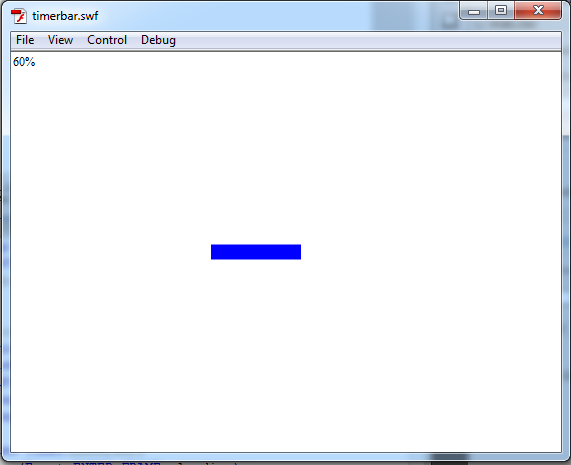
var square:MovieClip = new MovieClip();
var loader_txt:TextField = new TextField();
addChild(loader_txt);
addChild(square);
//square.graphics.lineStyle(3,0x00ff00);
square.graphics.beginFill(0x0000FF);
square.graphics.drawRect(0,0,150,15);
square.graphics.endFill();
square.x = stage.stageWidth/2-square.width/2;
square.y = stage.stageHeight/2-square.height/2;
var myTimer:Timer=new Timer(1000,10);
this.addEventListener(Event.ENTER_FRAME, loading);
myTimer.start();
function loading(e:Event):void {
var total:Number=5;
var loaded:Number=myTimer.currentCount;
square.scaleX=loaded/total;
loader_txt.text = ((loaded/total)*100)+ "%";
if (total==loaded) {
play();
this.removeEventListener(Event.ENTER_FRAME, loading);
}
}
var myTimer:Timer=new Timer(1000,10);
this.addEventListener(Event.ENTER_FRAME, loading);
myTimer.start();
function loading(e:Event):void {
var total:Number=10;
var loaded:Number=myTimer.currentCount;
bar_mc.scaleX=loaded/total;
loader_txt.text = ((loaded/total)*100)+ "%";
if (total==loaded) {
play();
this.removeEventListener(Event.ENTER_FRAME, loading);
}
}

zoom in, zoom out in as3
var count_zoom:Number = 0;
zoomInButton.addEventListener(MouseEvent.MOUSE_DOWN, zoomIn);
zoomOutButton.addEventListener(MouseEvent.MOUSE_DOWN, zoomOut);
function zoomIn(e:MouseEvent)
{
bg.scaleX += .1;
bg.scaleY += .1;
count_zoom++;
}
function zoomOut(e:MouseEvent)
{
bg.scaleX -= .1;
bg.scaleY -= .1;
count_zoom--;
}
stage.addEventListener(Event.ENTER_FRAME, loop);
function loop(e:Event)
{
if (count_zoom == 0)
{
trace("0");
zoomOutButton.visible = false;
}
if (count_zoom == 5)
{
trace("5");
zoomInButton.visible = false;
}
if (count_zoom >= 1 && count_zoom <= 4)
{
trace("1,2,3,4");
zoomInButton.visible = true;
zoomOutButton.visible = true;
}
}
1. Create movieclips instance name of bg, zoomInButton, zoomOutButton
Out put :-

swap depth using 'contains' keyword
var a:MovieClip = new MovieClip();
a.graphics.beginFill(0xFF0000);
a.graphics.drawRect(0,0,200,200);
a.graphics.endFill();
addChild(a);
var b:MovieClip = new MovieClip();
b.graphics.beginFill(0x00FF00);
b.graphics.drawRect(0,0,200,200);
b.graphics.endFill();
b.x = 350;
addChild(b);
var c:MovieClip = new MovieClip();
c.graphics.beginFill(0x0000FF);
c.graphics.drawCircle(0,0,50);
c.graphics.endFill();
a.addChild(c);
stage.addEventListener(MouseEvent.CLICK, swapChild);
function swapChild(e:MouseEvent){
if(a.contains(c)){
b.addChild(c);
}else{
a.addChild(c);
}
}
a.graphics.beginFill(0xFF0000);
a.graphics.drawRect(0,0,200,200);
a.graphics.endFill();
addChild(a);
var b:MovieClip = new MovieClip();
b.graphics.beginFill(0x00FF00);
b.graphics.drawRect(0,0,200,200);
b.graphics.endFill();
b.x = 350;
addChild(b);
var c:MovieClip = new MovieClip();
c.graphics.beginFill(0x0000FF);
c.graphics.drawCircle(0,0,50);
c.graphics.endFill();
a.addChild(c);
stage.addEventListener(MouseEvent.CLICK, swapChild);
function swapChild(e:MouseEvent){
if(a.contains(c)){
b.addChild(c);
}else{
a.addChild(c);
}
}
How to set depth index in action script
var aindex = getChildIndex(a);
var bindex = getChildIndex(b);
var cindex = getChildIndex(c);
trace(aindex);
trace(bindex);
trace(cindex);
xx.addEventListener(MouseEvent.CLICK, clickScrollerItem);
function clickScrollerItem(e:MouseEvent):void
{
//setChildIndex( bindex, 0);
if (a > b)
{
setChildIndex(a,b.numChildren);
}
if (a < b)
{
setChildIndex(a,b.numChildren-1);
}
trace(aindex);
trace(bindex);
trace(cindex);
}
1. Create a movieclips with the instance names a,b,c,d.
Arrange as per the Fig below and press Ctrl+Enter to check output :
0
1
2

play sound using button in action script 3.0
var my_sound:SoundId = new SoundId();
var my_channel:SoundChannel = new SoundChannel();
play_btn.addEventListener(MouseEvent.CLICK, playSound);
stop_btn.addEventListener(MouseEvent.CLICK, stopSound);
function playSound(event:MouseEvent):void{
my_channel = my_sound.play();
}
function stopSound(event:MouseEvent):void{
my_channel.stop();
}
1. Create play button instance of 'play_btn'.
2. Create stop button instance of 'stop_btn'.
Subscribe to:
Posts (Atom)